


Welcome to this FREE EDITION where we go down the rabbit hole on how AI impacts you, your career, your business, society & culture. Paid subscribers get full access to all newsletters, curated podcast Q&A notes, deep-dives and field guides. Thank you for reading and consider subscribing.
Everyone is talking about “AI agents,” but there’s not a lot of good information out there on how they actually work and why they’re important, because they’re either too technical or simply too vague. This piece cuts through the jargon and shows, in plain language, how agents turn today’s chatbots from clever Q&A machines into capable teammates that remember, plan, and act on your behalf. If you’ve ever felt stuck copy‑pasting between tools and wish your software could finally “just handle it,” this is your guide.
If you’re reading this, you probably would like to learn more about AI agents, but don’t want to overwhelm yourself with all the technical jargon and articles out there. Let’s assume you’ve been using ChatGPT for — what — a year now? Maybe longer. And somewhere in that time, you’ve probably had this moment:
You open a new chat. You start typing. And then you sort of realize…you need to re-explain everything. Your job. Your preferences. The project you’re working on. The context from last Tuesday’s convo was genuinely useful, but it’s now buried somewhere in your chat history.
So you do what we all do. You copy-paste. You re-prompt. You manually stitch together information from your email, your calendar, your notes app, and the chat window — acting as the human glue between tools that don’t really talk to each other.
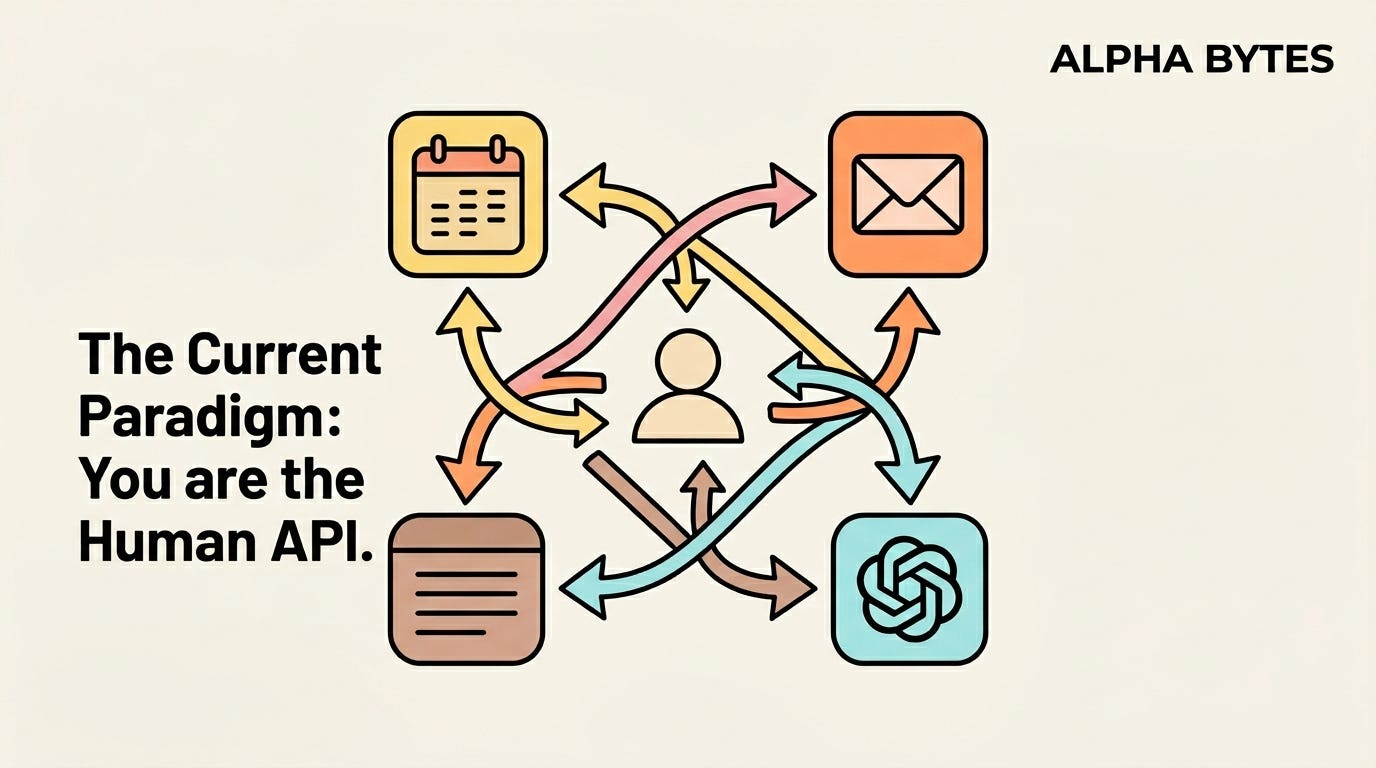
It’s powerful, but it’s also kind of exhausting 😮💨
The problem is that most people feel that tools like ChatGPT are incredibly smart, but it doesn’t actually do anything. It answers, can suggest things, and also generates stuff. But it doesn’t act on your behalf. It doesn’t remember who you are over long stretches of time. It also doesn’t know what’s on your calendar tomorrow or what your boss emailed you an hour ago.
This is where Agents come in.
Before We Go Further — What You Already Know
I’m going to assume you already get the basics. You’ve used chatbot tools like ChatGPT, Claude, Gemini, Grok, DeepSeek(?), or something similar. You understand the general concept: you type a prompt, the AI responds, and sometimes, the response is genuinely good.
Well, here’s a quick mental framework for what’s happening under the hood…
All of these tools are powered by LLMs (Large Language Models). An LLM is essentially a prediction machine. It reads your prompt, draws on patterns from a huge amount of training data, and predicts what words should come next. It’s incredibly fluent and capable of reasoning through complex problems, but fundamentally reactive. It waits for you. It responds. Then it sits there.
It can’t plan ahead and doesn’t take action.
So in essence, the mental model here is that:
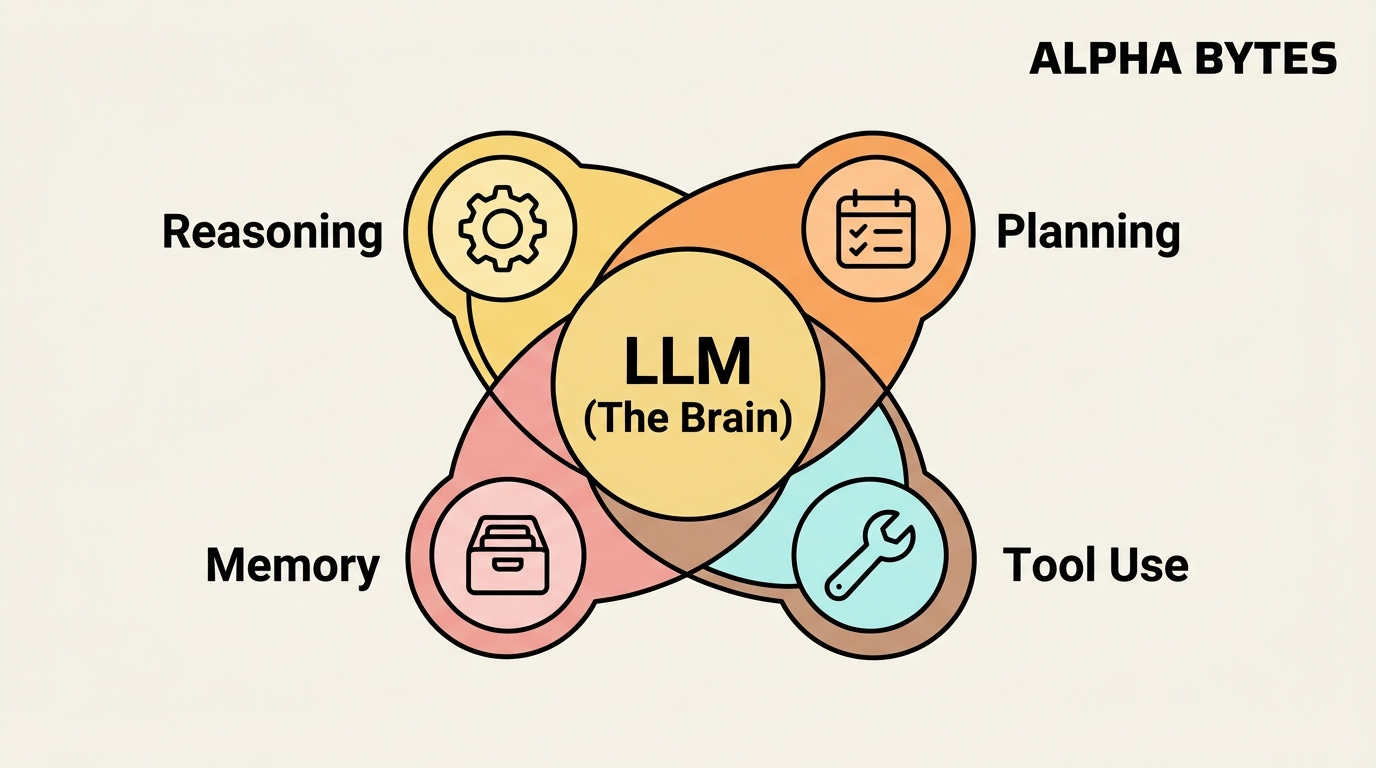
An LLM is a brain, but a brain without a body. No hands to do things with. No memory to learn from. No awareness of the outside world to act on.
So it’s time to give this a body.
Before we continue, here’s some additional reading on better understanding the AI landscape, including all the fancy words that come with it in an easy-to-digest way:

So What Actually Is an AI Agent?
This is where the hype usually kicks in, and where most explanations can get hairy. They’re either very technical to follow along or too vague, so you walk away thinking an “Agent” is just a chatbot with a fancier name.
Here’s a definition you can refer back to:
An AI agent is a system that takes a goal, figures out the steps to achieve it, and then actually does the work using tools, information, and memory — with minimal hand-holding from you.
That’s really it. That’s the core concept.
The easiest way to understand agents is to compare them to what you already know:
ChatGPT is like texting a brilliant stranger. You ask a question, and they give you a great answer. But they don’t know you. They can’t check your calendar. They can’t send an email on your behalf. And every conversation starts from scratch. Think of it as a one-shot interaction: question in, answer out.
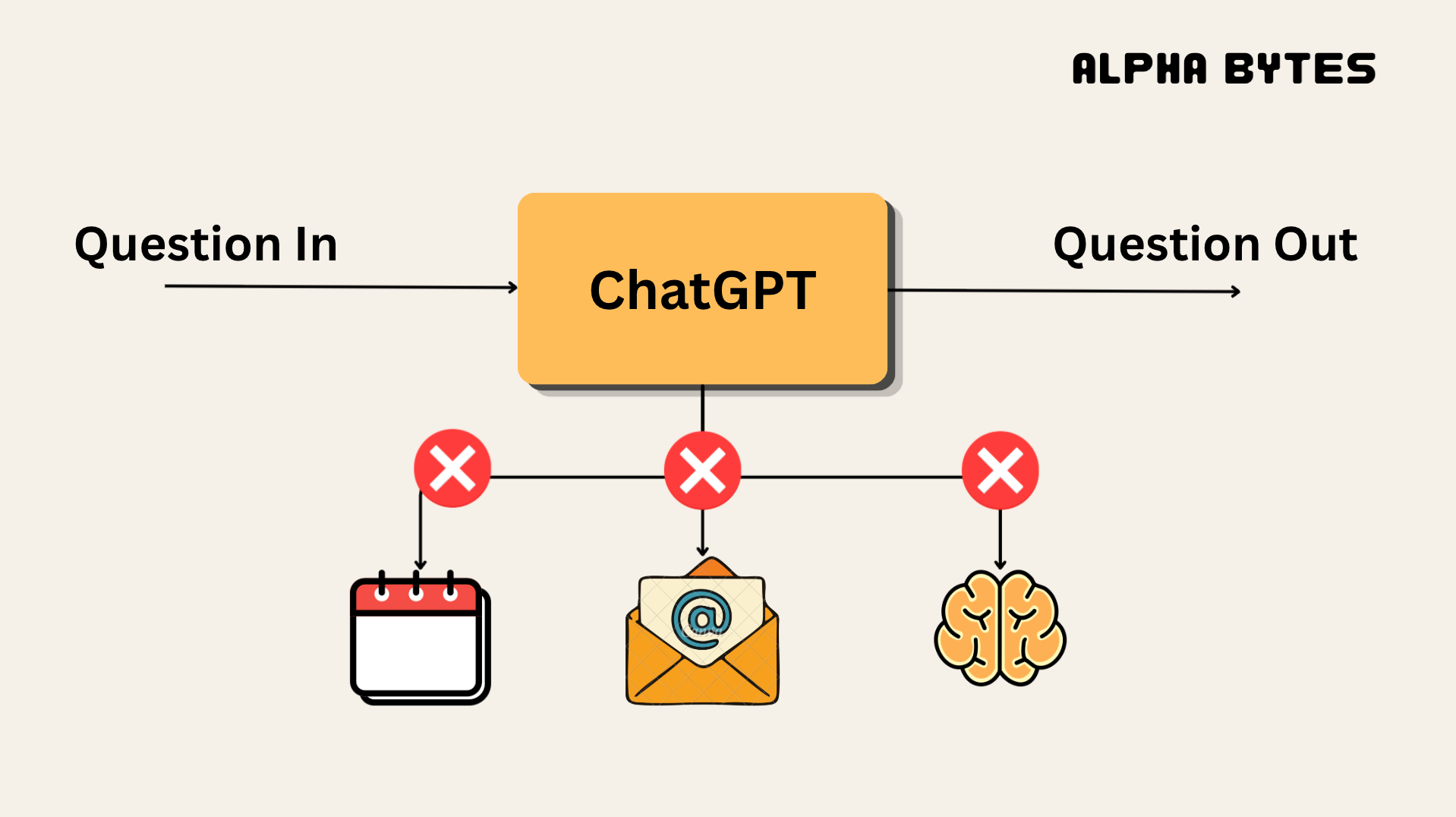
An AI agent is like a capable assistant. This assistant knows your preferences. They have access to your calendar, your email, your files, etc. They can research options, draft messages, book reservations, and update your to-do list — all from a single instruction like “organize dinner for the team next Thursday”. They don’t just tell you what to do. They actually do it.
And here’s the part that trips most people up: Agents are NOT a different type of AI. They’re not some new model that replaces ChatGPT. They’re an architecture built around the same LLMs you’re already using. The LLM is still the brain — the thing that understands language, reasons through problems, and generates responses. The agent framework is everything else: the memory, the tools, the planning layer that turns the raw intelligence into useful action.
You can think of it this way: the LLM is the engine. The agent is the car.
The engine is what generates power. But the car is what gets you somewhere — with steering (planning), a fuel tank (memory), a GPS (tool access), and wheels (the ability to act on the world).
And—this is important…it means agents get better automatically as LLMs improve as well as its understanding of you and your data.
The Four Superpowers
Okay, so Agents are LLMs with a body. But what can the body actually do, and how does it do it?
I — Reasoning
We already know that LLMs can answer questions. But Agents, because they’re an extension of chatbots, can actually think through problems — not just retrieve information, but weigh trade-offs, consider constraints, and make judgment calls when it’s about to execute on an action.
Here’s a small task you can do:
Ask ChatGPT (or another chatbot): “What’s a good flight to Sydney?”
You’ll get a list of options and some general advice. Pretty useful, sure. But you’re still the one comparing prices across tabs, checking layover durations, and figuring out whether that 6 am departure is actually worth the savings.
Now, ask an Agent:
“Find me the best flight to Sydney that balances cost, layover time, and my Qantas loyalty points — and make sure I land before my meeting at 2pm on Tuesday.”
Here, the Agent doesn’t just search. It reasons across multiple factors simultaneously, eliminates options that don’t fit your constraints, and presents you with a ranked recommendation.
Or something even simpler:
“Should I accept this meeting invite?”
A chatbox can’t answer that. An Agent that knows your priorities, your workload, and that you’ve been trying to protect your Wednesdays for focused work can make a genuinely informed suggestion.
The concept of reasoning comes about because of a powerful idea: chain-of-thought.
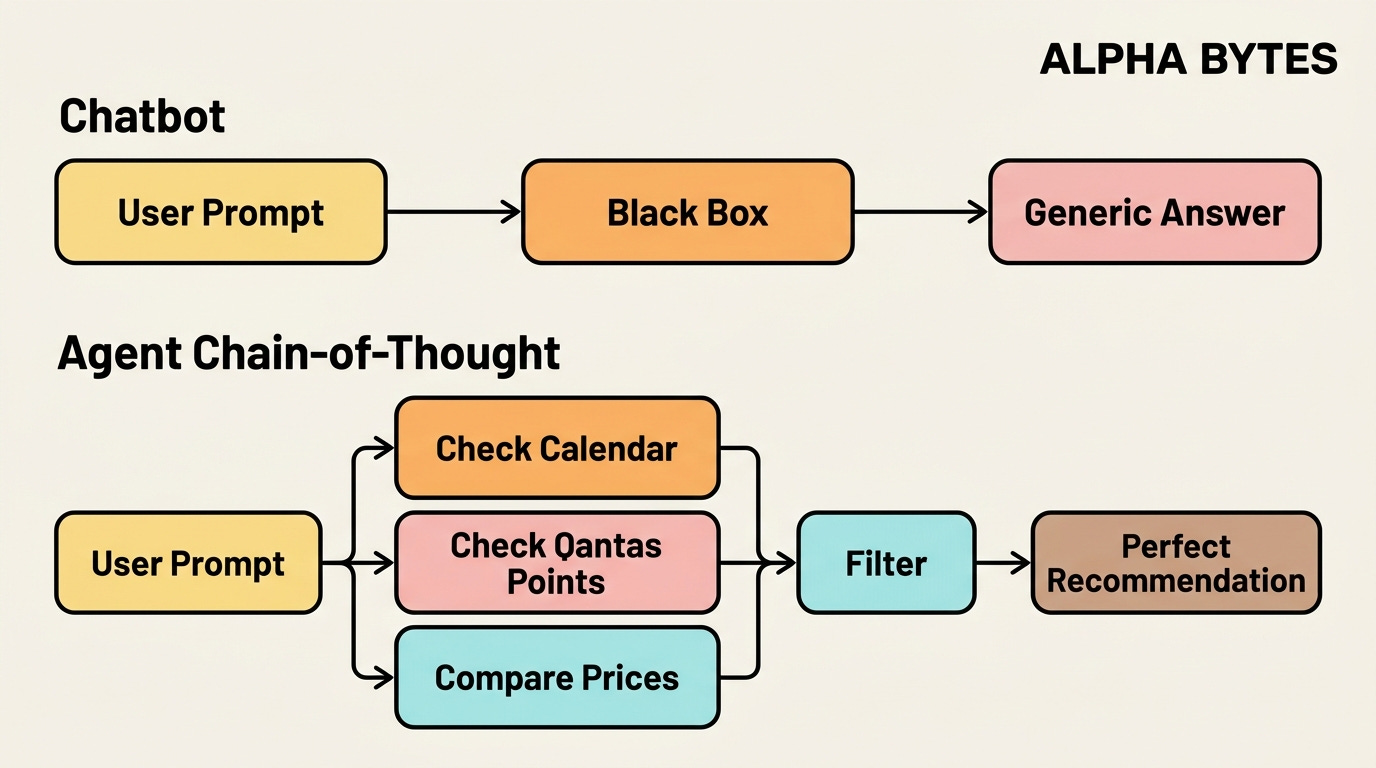
Chain-of-thought is the idea that a model doesn’t just jump to an answer, it writes out the steps of its reasoning along the way — like showing its work on a math problem instead of only giving the final number.
In the same way, the above example contrasts a basic chatbot (“What’s a good flight to Sydney?”) with an agent that weighs cost, layover time, loyalty points, and arrival before 2pm.
So chain-of-thought is the internal process where the model:
Unpacks the question into subproblems.
Considers different options or interpretations.
Applies rules or heuristics (“earlier arrival is better than extra points”, “protect Wednesdays for focus time”).
Combines these into a conclusion.
If you could see that process printed out, it looks like a chain of short reasoning steps: “First, identify all Tuesday flights that land before 12pm. Next, filter by cost…”.
Doing this gives reasoning a few useful behaviours:
It helps the model decompose complex questions into smaller ones (“What constraints do I have? What are the options? How do I score them?”).
It lets the model check its own work (“Does this flight actually land before 2pm?”).
It makes the decision more transparent: you can read the chain and see why a recommendation was made.
Agents layer on top of this because they use chain-of-thought as a planning script that sequences tools and data sources, turning “think step by step” into “act step by step in the real world.”
II — Planning
This is the one that genuinely is exciting because an Agent can take a complex goal and decompose it into a sequence of logical steps—then execute them in order.
“Organise a team dinner for 8 people next Thursday.”
A chatbot gives you restaurant suggestions. But an Agent checks everyone’s calendar for conflicts. Searches for restaurants with availability for 8 pm on Thursday night. It might also cross-reference dietary restrictions. Makes the reservation. Sends the calendar invites to the team. Adds a reminder for you the day before etc.
This then becomes an interesting coordinated workflow.
III — Memory
This is the capability that solves the exact frustration I opened this piece with.
Short-term memory means the agent remembers what you said earlier in the conversation, which is the full thread, not just your last message. But more importantly, long-term memory means it remembers things across conversations. It learns that you prefer window seats. That you always cc your assistant on meeting invites. That you hate early morning flights, and so on.
Memory is the part that transforms a tool into something that feels genuinely intimate to the individual or to the organization if deployed across a business.
Over time, the Agent becomes yours. It doesn’t just know what you asked — it also knows how you think. And that’s a really good moat, no other tool has ever really had: an AI that gets better specifically for you the more you use it.
IV — Tool Use
These are the hands and feet. It’s the part that lets Agents interact with the real world beyond the chat window.
An Agent with tool access can send emails, search the web, query databases, update spreadsheets, book flights, manage your calendar, read documents, and interact with other software on your behalf.
It’s the difference between an AI that tells you what to do and one that does it for you.
This becomes a force multiplier, because:
Reasoning without tools is just thinking.
Planning without tools is just building a to-do list.
Memory without tools is just a diary.
But if you combine all four — reasoning, planning, memory, and tool use — and you get something qualitatively different from any chatbot you’ve used before.
Here’s how it looks in practice:
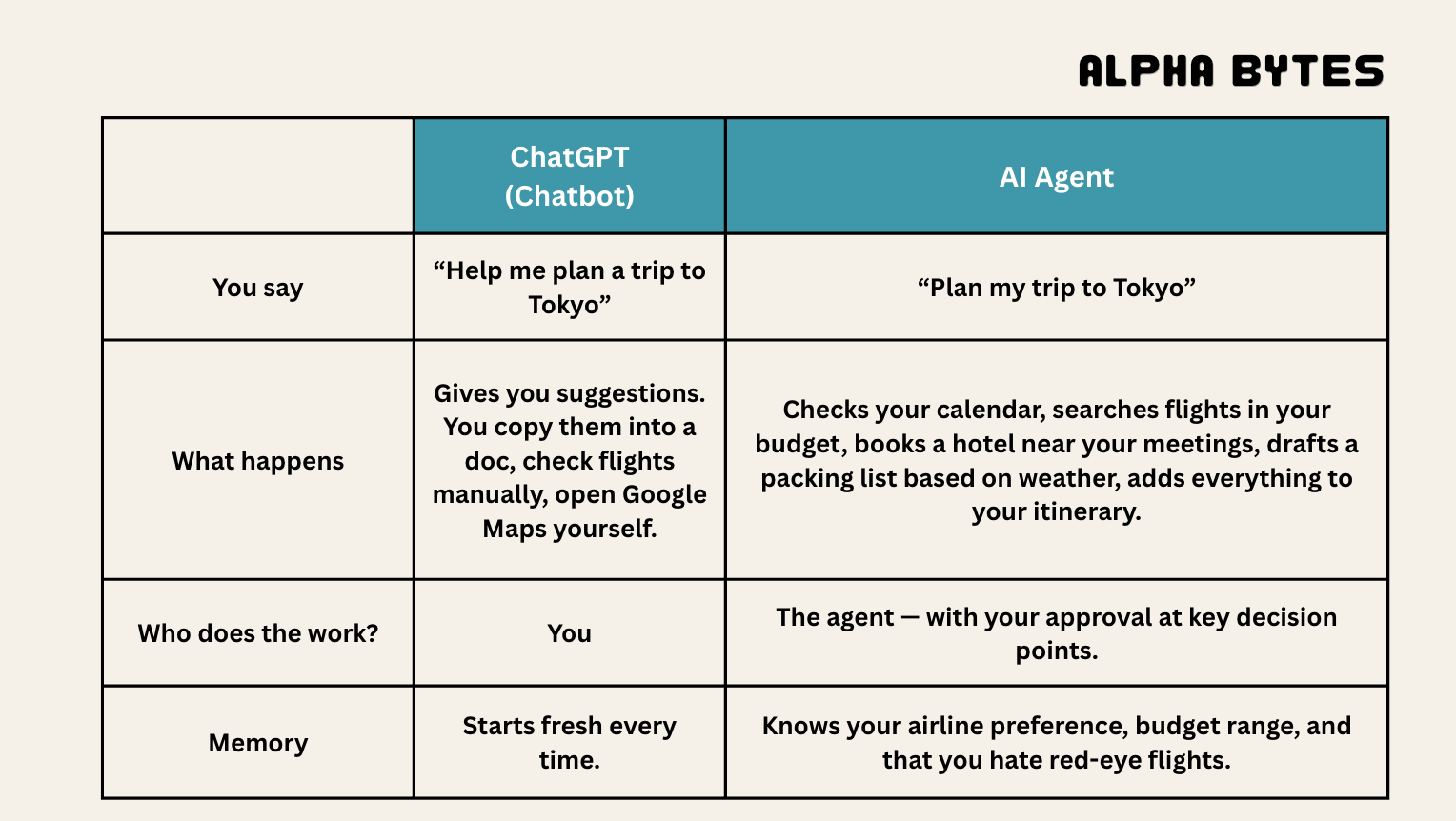
See the difference?
If you want more information on how these models access tools, you can check this previous article on how they communicate:

Not All Agents are Created Equal
Now, before you go thinking every “AI Agent” you see is the same thing — it’s not. There's actually a wide spectrum, and understanding it helps you spot what’s real versus what’s just marketing. You can think of these tiers as a ladder of increasing autonomy and coordination, not just “smarter vs dumber.”
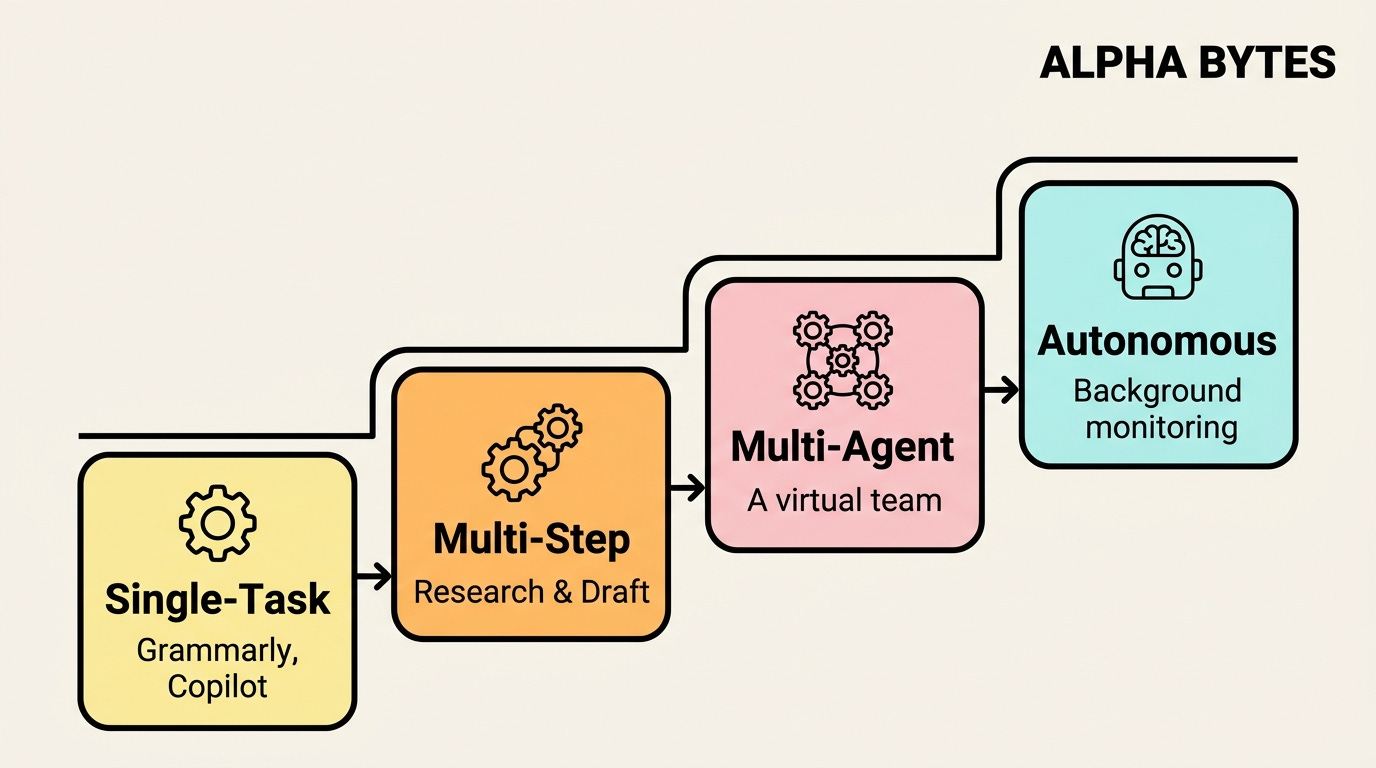
I’ll expand each with how they work, examples, and what tends to go wrong.
Tier 1: Single-task Agents
One job, done well. Your grammar checker that suggests rewrites (Grammarly). Your coding assistant that autocompletes code (GitHub Copilot). An email triager that sorts and prioritises your inbox. I bet you’ve almost certainly used one of these already — you just didn’t call it an “agent.”
These agents are essentially “smart functions” wrapped in an interface. They:
Take a well‑defined input.
Apply a narrow capability.
Return an output immediately, usually in one shot.
Under the hood, many of them are just a single model call (or a short chain) with some guardrails and prompt engineering. Grammarly, Copilot, or an AI image upscaler are classic: they don’t remember a long history, they don’t plan, they just respond to the current request.
Tier 2: Multi-step Agents
These can handle workflows, not just individual tasks.
For example: “Research our top three competitors, summarise the findings, draft a slide deck with key takeaways, and email it to my team.”
That’s using multiple tools, multiple steps, and one instruction. This is where things start to get genuinely useful for knowledge workers.
They introduce:
Planning: breaking a natural‑language instruction into sub‑tasks.
Tool orchestration: calling different APIs/tools in sequence (search, write, summarise, format, send).
Memory across steps: using outputs from earlier steps to inform later ones.
Here are some more examples:
“Research X and give me a three‑page memo with citations.”
“Turn this meeting transcript into an action‑item list, then create calendar events for each deadline.”
“Draft code, run tests, and fix failing tests until they pass.”
Architecturally, you’ll see: the “planner” component that decides the next action, which then uses a set of tools (search, file I/O, email, calendar, code execution), and a loop where the agent observes results and decides the next step until the goal is met or a limit is hit.
Tier 3: Multi-Agent Systems
This is where it gets really interesting. Multiple specialised agents working together — one researches, one writes, one fact-checks, one formats. Think of it like a small team where each member has a specific role, but they’re all AI. They coordinate, hand off work, and produce an output that no single agent could have created alone. If you’ve ever managed a project by delegating different tasks to different people and then stitching the results together — that’s what’s happening here, except the “people” are specialised AIs and the coordination happens in seconds (or minutes), not days.
The key aspects include:
Role specialization: different agents are tuned/prompts for specific roles (researcher, writer, editor, fact‑checker, designer, PM).
Coordination layer: something (another agent or a framework) routes tasks between them, aggregates outputs, and resolves conflicts.
Parallelism: multiple agents can work at once, then merge their results.
Tier 4: Autonomous agents
These operate with minimal human oversight over extended periods. They monitor your inbox continuously. Flag urgent items. Draft responses for routine messages. Schedule follow-ups. Run in the background while you focus on deep work.
These push beyond “complete this workflow” into “continuously pursue this goal over time.”
This is where you have:
Long‑lived goals: “Keep my inbox sane,” “Grow this marketing channel,” “Monitor this system and respond to anomalies.”
Continuous operation: they run on a schedule or event triggers, not only when you click a button.
Environmental awareness: they monitor data sources (email, dashboards, logs, CRMs) and decide when to act.
Self‑directed planning: they set and revise sub‑goals, not just follow a pre‑written checklist.
We’re in the early innings here, but this tier is evolving super fast — and it’s the one that most people picture when they hear “AI agent,” even though the majority of real-world agent adoption today is happening at Tiers 1 and 2.
The key thing here is that you’ve probably already used a Tier 1 agent without realizing it. The shift happening right now is the move from Tier 1 to Tiers 2 and 3 — and it’s happening faster than most people appreciate. The question isn’t whether agents will become mainstream. It’s whether you’ll be comfortable using them by the time they do.
OpenClaw, Claude Managed Agents, and OpenAI Frontier are all examples of where this is going.
What This Actually Means for You
So now we understand what Agents are, how they work, and the types that exist, the obvious next question is: so what?
There’s a big shift happening right now (2026).
Today, you are the user. You open the apps. You click buttons. You copy-paste between systems. You are the operator of your tools. The value you provide is in knowing how to use the tool — like which buttons to click, which formulas to write, which menus to navigate, etc.
With Agents, you become the director (or orchestrator). You describe the outcome. You delegate execution. You define what needs to happen and why — and the Agent figures out the how. The skill that matters isn’t really Excel proficiency or Photoshop. It’s the skill of clear thinking, good judgment, and the ability to communicate what you want with precision.
What’s happening is that the skill premium is shifting from execution to direction — this is a big deal for jobs & careers.
Potentially, it could look something like this:
“Summarise my overnight emails. Flag anything from the leadership team. Draft responses for the routine requests. Cancel my 10am if there’s a conflict with the client call. Block two hours for deep work on the Q3 strategy doc. And pull the latest revenue numbers into that doc before I start.”
The above instruction uses multiple tools, has multiple steps, and zero plumbing between all the tools.
Also, I want to be honest about the limitations here, because this isn’t a hype piece.
Agents do make mistakes. They can misinterpret instructions. They occasionally do things you didn’t ask for. Trusting an agent with your email is a lot like trusting a new hire. You really don’t hand over the keys on day one. You should verify. You should check. You should build confidence over time. And the best Agents are designed with guardrails that ask for your approval before taking high-stakes actions.
But the trajectory is pretty clear. And the people who start learning to work with Agents now, even imperfect ones, will have a significant advantage over those who wait until it’s frictionless.
Delegation Anxiety
The biggest barrier to adoption isn’t really the technology. It’s not the accuracy, not the costs, and it’s not access.
It’s TRUST.
More specifically, it’s delegation anxiety—which is the deeply human discomfort of letting something else act on your behalf.
We’ve spent years being trained to do things ourselves with software. Click, drag, type, format, send. We’re conditioned operators. Our entire relationship with tech has been built around direct control. We like being in control, and it’s how we’ve been taught to be productive.
Agents require the opposite skill: letting go.
It’s like the first time you let someone else drive your car. You know the car is the same. The road is the same. But something in your brain says: I should be the one doing this. Even when the other person is a perfectly competent driver.
I’ve noticed this in myself.
Even when I know an Agent can handle a task faster and more reliably than I can, there’s this strange friction. It’s like an instinct to open the app and do it manually “just to be sure.” It’s irrational. But it’s real. And I think almost everyone is going to feel it.
The irony is that this is the same psychological hurdle every manager faces when they hire their first direct report.
You know, delegation is how you scale.
You know you can’t do everything yourself.
But letting someone else handle the thing you used to own? That takes a lot of practice. It takes trust built through small wins.
Agents are no different. Start small. Let it handle something low-stakes — sorting your inbox, summarising articles, drafting a first pass of a report. Watch the output. Correct where needed. And gradually expand the scope as your confidence grows.
This is why I think the people who adapt fastest to the Agent era won’t necessarily be the most technical. They’ll be the ones most comfortable with delegation and ambiguity. The ones who can articulate a clear outcome, trust the process, and intervene only when necessary.
The Bigger Picture: Agents Talking to Agents
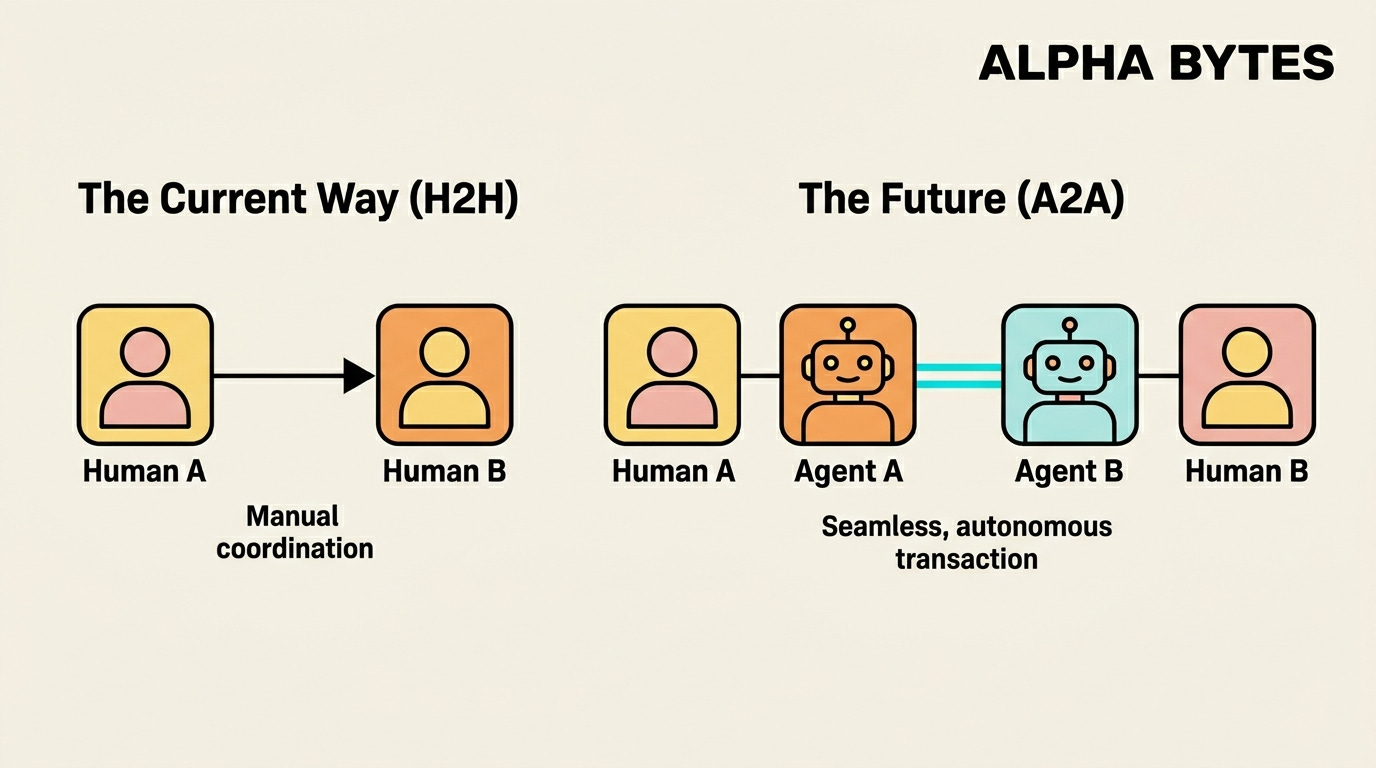
Before we wrap this up, I did want to leave you with one more thread to pull on.
Everything I’ve described so far is Agents working for you. But here’s where it goes further: Agents are starting to work with each other.
Here are just a few examples of what this could look like:
Your Agent might negotiate with a restaurant’s booking Agent to find availability.
Your company’s scheduling Agent might coordinate with a client’s scheduling agent to find meeting times — without either human touching a calendar.
A travel Agent AI might communicate with an airline’s agent AI to find, book, and modify flights on your behalf.
This is the Agent-to-Agent economy — and it’s already live. Google’s A2A (Agent-to-Agent) protocol is already in production across hundreds of organisations. It handles agent discovery, capability advertising, and task negotiation so that AI agents can find each other, verify trust, and transact all without a human in the loop.
The interfaces are decoupling from the capabilities. And the “users” of those capabilities are increasingly other agents.
But that’s a rabbit hole for another day. For now, here’s what matters...
The Bottom Line
The technology isn’t perfect yet.
But it’s real, it’s shipping, and the gap between where it is today and where it’s going is closing faster than most people realise. The best Agents right now are somewhere between a brilliant intern and a competent junior hire — impressive in spots, occasionally surprising, and getting meaningfully better every month.
Most people won’t truly understand this shift for another year or two.
You’re ahead of the curve now. And the single best thing you can do is start experimenting — find one task in your daily workflow that’s repetitive, multi-step, and annoying, and see if an agent can handle it.
Let me know if this was useful and valuable to you in any way by replying to this piece, sharing it with others, and liking the post.
In the near future, I’ll be adding more practical guides on how to build & work with Agents as this space develops.
If you liked this, please consider subscribing and sharing it. Thanks for reading until the end.
🙏🏼 Connect with me
If you think this could be helpful and informative to others, please share it :)
Thanks for reading, and see you next week!
Barry.