



Welcome to this GUEST POST where we go down the rabbit hole on how AI impacts you, your career, your business, society & culture. Paid subscribers get full access to all newsletters, curated podcast Q&A notes, deep-dives and field guides. Thank you for reading and consider subscribing.
To describe Wyndo’s growth over the past 18 months as impressive would be a total understatement.
He’s quietly built a 23,000+ subscriber following on Substack in just a short time and earned deep respect across the builder community. In an AI media landscape flooded with influencers turning the hype knob up to 11, Wyndo stands out for one simple reason: pure signal.
While most creators ship generic prompts and speculative listicles, Wyndo builds thoughtful, battle-tested mental models grounded in real operational experience.
And honestly, the biggest challenge facing professionals today isn’t predicting AI five years out, but it’s navigating how AI rewires our daily workflows in the next 12-24 months. Those who master this shift early will be able to capture outsized leverage.
In today’s guest deep-dive, Wyndo breaks down The Three Levels of AI Workflows, which moves from isolated browser chat tabs to fully agentic workspaces and gives us the exact tactical blueprint to level up into each stage.
Take it away, Wyndo!
For more from Wyndo, check out his newsletter AI Maker, connect with him on LinkedIn, or explore his advisory work.
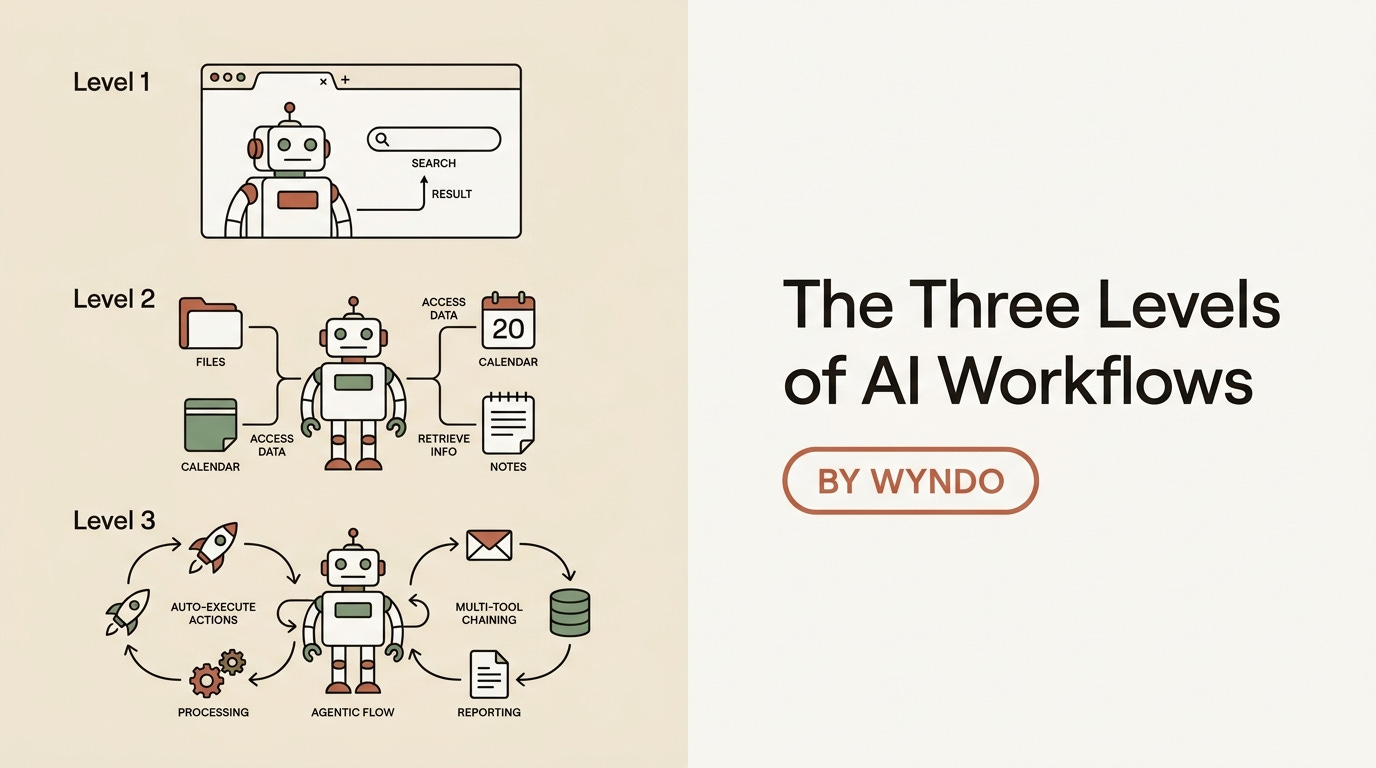
There is a growing global trend of people, from knowledge workers and marketers to freelancers and small business owners, who are familiarizing themselves with AI. They experiment with ChatGPT (Codex), Claude, and Gemini, and begin integrating AI into their daily routines. But the gap between ”I’ve tried AI” and ”AI has meaningfully changed how I work” remains a massive gap.
Based on what I’ve seen across my audience and clients, the people who successfully cross that gap are not smarter, more technical, or even earlier adopters.
They simply changed two things at once:
How they collaborate with AI
What they choose to pursue once technical barriers fall
First, they stopped treating AI like a transaction. This is where you type a question, take an answer, and close the tab. Instead, they treat AI as a long-term thinking partner across every step of their workflow. They bring AI into the initial brainstorm, ask it to find the weakest part of an idea before anyone else can, run plans past multiple stakeholder perspectives, and use it to sharpen the question before chasing the answer. By the time execution begins, AI has been involved in ten conversations leading up to it.
Second, they start chasing ideas they used to abandon purely because of technical friction. If you want to ship a SaaS, you code it. If you want a custom tool for newsletter analytics, you build it. When your technical excuses evaporate, what remains is curiosity, agency, and judgment: are you curious enough to push past the first wall? Do you have the agency to commit before someone gives you permission? Do you have the judgment to know which ideas are worth chasing? AI doesn’t fix those for you.
So the gap between “I’ve tried AI” and “AI changed how I work” comes down to two shifts: 1) How you collaborate with it, and 2) what you let yourself attempt once the technical wall comes down. The people on the right side of the gap rebuilt both, quietly, while everyone else was still prompt engineering.
The Copy-Paste Tax: Stop Being a “Context Window with Legs”
The primary friction holding most professionals back is what I call the copy-paste tax— it’s like the hidden cost you pay every time you carry context across tool boundaries by hand.
What I mean by this: you look up your own old notes, paste them into ChatGPT, ask for a draft, copy the result back into Google Docs, and then re-explain your target audience to a different model the next morning. Multiply that across every session, project, and week, and eventually create this drag for yourself.
The dirty secret of Level 1 AI usage (we’ll touch on this soon) is that you, the human, are doing the heavy lifting AI was supposed to handle. You become a glorified router, which is a context window with legs.
To eliminate this tax without overhauling your entire tech stack, you only need two strategic moves:
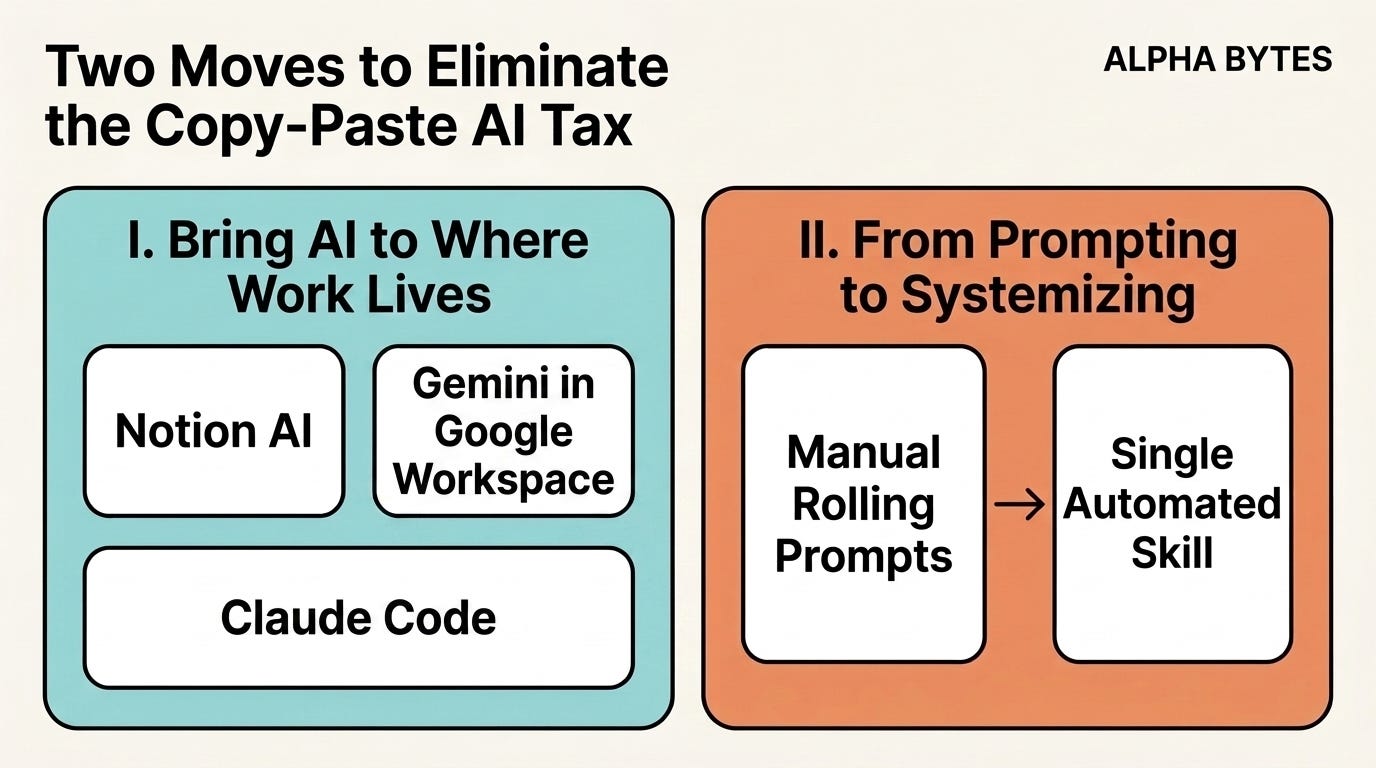
I — Bring AI to Where the Work Already Lives
You should pick the single workflow that drains you the most, whether it’s newsletter drafting, admin, client recaps, or maybe proposals.
Identify where the source material lives (Notion, Google Docs, Markdown, or your inbox) and bring AI directly to that surface. If your work lives in Notion, enable Notion AI custom instructions. If it lives in Google Workspace, use Gemini in the sidebar. If you use markdown, point Claude Code at your local folder. This single change eliminates roughly 70% of the copy-paste tax in that workflow.
II — Stop Typing Requests from Scratch (From Prompting to Systemizing)
AI in 2026 (and beyond) is far more agentic than most people realize. It doesn’t just answer questions; it properly executes. The bottleneck isn’t whether AI can perform the work but whether you have systemized the request so you don’t retype it every time. Write down your workflow as a system instead of a prompt: describe the goal, desired output, audience, quality standards, and self-check steps. My newsletter drafting flow used to be a giant rolling prompt I retyped weekly. Today, it’s a single Claude Skill fired from one command. The first setup takes an afternoon; every run after costs a single sentence.
Overcoming Tool Fatigue
AI tool fatigue on platforms like Reddit and Hacker News is real, driven largely by novelty cycles. You see a flashy demo on X or YouTube, get a spike of dopamine, sign up that night, and forget the tool exists three days later. After a year of trying fifty tools, nothing about how you actually work has changed.
I want to be honest about where most of it actually comes from. It’s just novelty.
The filter I use now is one question: does this overlap with how I already work?
If I look at the demo and I can immediately picture the slot in my own week where this tool would fit (a workflow it improves, a friction it removes, a step it shortens), it might be worth a real test. If I can’t picture that slot, I leave it. No matter how good the demo looks. Because if it doesn’t connect to a real piece of my work, I’ll try it twice and never open it again. The FOMO will be uncomfortable for a few days, then it will pass.
The harder thing to admit: that filter took years to build.
In the early days, I jumped. I tried every tool that came out for months. I think a lot of people are in that phase right now, and that’s okay. You don’t develop the muscle of “is this actually useful for me?” without trying enough tools to feel the difference between excitement and fit. The phase is part of the journey. The mistake is staying there forever.
What changes when the muscle kicks in is the speed.
You see the launch.
You imagine it inside your real week.
You can already feel whether the friction it removes is friction you actually have.
That intuition is what saves you from the FOMO loop.
My current stack is shorter than people expect.
I write and run my newsletter operation inside Claude Code most days.
I use Codex for some coding work.
For my creative workflow (image generation for thumbnails, carousels, infographics), I’ve been using Glif for three to four months now and counting.
That’s the signal I trust. If I’m still using a tool a quarter later, it earned its place. If I forgot it existed, that was the right call.
So the question I’d give you the next time something starts trending: “If I try this for a week, can I see myself using it three months from now?” If you can’t picture it, save the time.
The 3 Levels of AI Integration: Why Prompting Is a Local Maximum
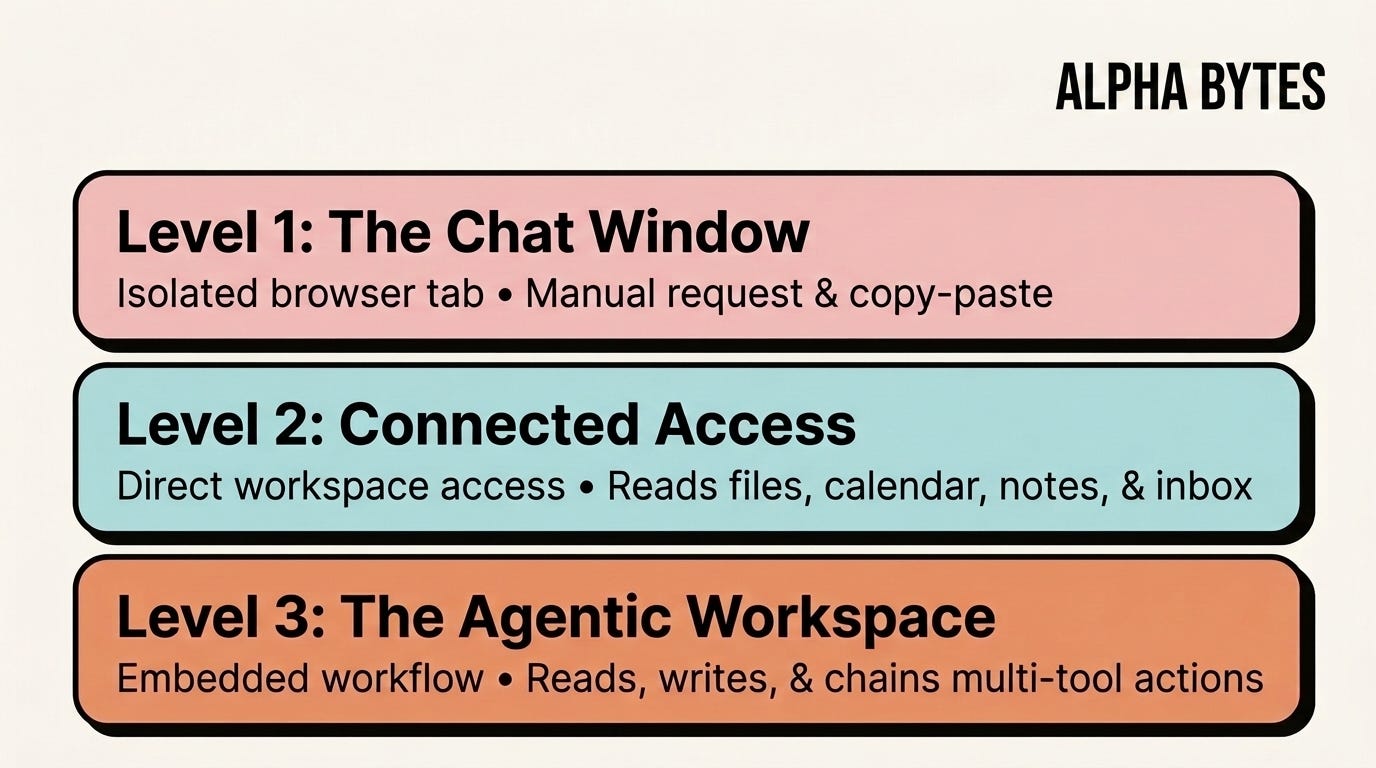
To build a truly functional workflow, you must understand the three distinct levels of AI integration:
Level 1 (The Chat Window): AI lives in an isolated browser tab. You go to it, type a request, copy the output, and leave.
Level 2 (Connected Access): AI has direct access to your work environment. It reads your files, calendar, notes, inbox, and existing tools.
Level 3 (The Agentic Workspace): AI lives inside your workflow. It reads, writes, and chains actions across tools without you orchestrating every intermediate step.
Most people are stuck at Level 1, and the misconception keeping them there is the belief that getting better at AI means getting better at prompts and becoming more technical.
That belief makes intuitive sense. You typed a bad prompt, you got a bad answer, so the obvious move is to write a better prompt next time. Prompt engineering courses, prompt libraries, prompt cheat sheets—that whole industry exists because the assumption feels right.
But it’s actually a local maximum.
What I mean by this is that you can become world-class at prompting and still be stuck doing the same exhausting copy-paste dance every day.
Level 2 is a car.
The first concrete step toward Level 2 has less to do with which AI you pick and more to do with whether that AI can connect to the tools you already use.
This is where MCP connectors and native integrations come in. Whether you use Claude, ChatGPT, or Gemini, the question I’d ask before I commit to one is whether it can plug directly into the tools where your work already happens. Notion. Asana. Google Docs. Google Sheets. Outlook. Your calendar. Your team’s shared drives. If your AI can read and write to those places without you uploading anything every session, you’ve moved off Level 1.
Once those connections are in place, the change is immediate. You bring an idea, and AI can pull the relevant docs from your Drive without you copying anything in. You ask for a plan, and it can read your Asana to know what’s already in motion. Your team shares a doc, and instead of opening it cold, you ask AI to summarise it first and tell you what to push back on. You generate a draft, save it back to Notion, and the loop closes without copy-paste.
That’s Level 2.
You haven’t built anything fancy. You haven’t written a single line of code. You’ve connected the AI to where your work already lives and stopped being the manual context delivery service for your own setup.
Level 3 is a different conversation (I’ll come back to this later).
But you can’t skip Level 2.
Anyone who tells you otherwise is selling something.
Shifting from “Extraction” to “Partnership”
I’m constantly harping on about the distinction between using AI as an “extraction” tool and treating it as a genuine thinking partner.
The biggest unlock isn’t really prompt hacking; it’s shifting from asking AI to thinking with AI.
Extraction sounds like this: “Write me a newsletter post about AI agents.”
Partnership sounds like this:
“I’m writing a newsletter post about AI agents. Here’s my current thesis: most people think agents are magic, but they’re only useful if you’ve already systemized your work first. Before I draft anything, what’s the weakest part of that argument? Who would push back hardest, and what would they say?”
The first prompt asks AI to do the thinking and hand you the result. The second prompt asks AI to help you think better, then commit to writing yourself. Both produce text. Only one makes you sharper.
Here’s the part most people miss when they talk about prompting.
The real value isn’t the output you get. It’s what happens to your own thinking when you try to articulate what you actually want.
When you sit down to write a real prompt (not a one-liner, but a real one with context, intent, audience, and examples), you find out fast whether you understand what you’re trying to do. Most of the time, the first version of your idea is messier than you thought. You think you want X. You start writing it down for AI. By paragraph two, you realise you actually want Y. Then you start arguing with AI about Y, and three exchanges later, you realise the real thing was Z all along, and Z is what you’ve been circling for weeks without seeing it.
That’s where the learning lives.
The friction of having to articulate a half-formed thought clearly enough for another mind to engage with it, even an artificial one, is what teaches you what you actually believe.
I do this almost every day with what I call brain dumps, where I open a fresh document, dump everything I’m thinking about a topic in raw form (no structure, no editing, no judgement) and hand it to the model.
“Here’s my messy thinking on topic [X]. What pattern do you see? What’s the strongest argument hiding here? What am I missing?”
Sometimes the answer comes back in three conversations. Sometimes it takes twenty. By the time we’re done, the idea I came in with usually isn’t the idea I leave with. That’s the point. The output is almost a side effect. The real product is a clearer head.
So if I had to compress the shift into one sentence:
AI does more than produce output. It pushes you to think clearly enough to articulate what you actually want, and the articulation itself is where most of the value lives.
Practically, here are the four moves I use every week.
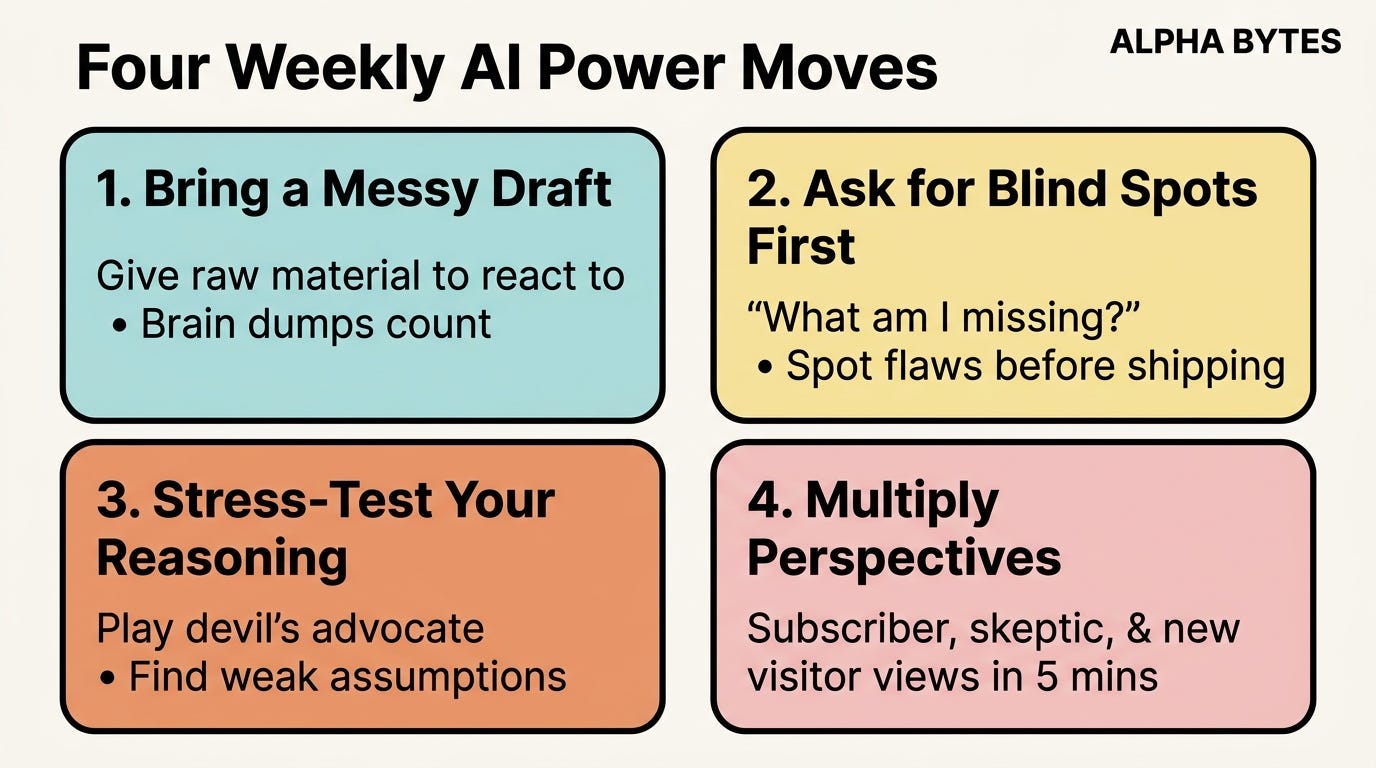
Bring a draft, even a messy one. A paragraph of half-formed thinking beats an empty prompt. Brain dumps count. You give AI raw material to react to instead of asking it to invent from nothing.
Ask for blind spots before you ask for output. “What am I missing? What questions should I be asking?” That single question has saved me from shipping bad work more times than I can count.
Stress-test on purpose. “Find the three weakest parts of my reasoning. Play devil’s advocate on this assumption.” AI is a fearless critic when you let it be one.
Multiply perspectives. “How would my paid subscribers react to this? How would a first-time visitor read it? What would a skeptic point to?” One brain, many viewpoints, in five minutes.
You’ll know you’ve made the shift when AI conversations stop feeling like requests and start feeling like working through a problem with a thoughtful colleague. Usually you walk out sharper than you walked in.
Practical Decision Tree: Where Should Your AI Live?
I’ve written plenty about how the right question isn’t “which AI tool should I use?” but “where does my AI actually live?”
For someone who’s completely new to AI and currently just using ChatGPT in a browser tab for occasional questions — this is how I think they should start answering that question.
When setting up your environment, forget tool benchmarks and answer one foundational question first: Where do you already do most of your work?
Walk through your last week.
Where did you write?
Where did you take notes?
Where did your client emails land?
Where did your meeting notes go?
Where do you keep half-finished ideas?
Where does your team share docs?
If most of those answers point to one place, that’s your starting answer. The decision tree builds from there.
If your work lives in Notion: Turn on Notion AI, write one custom instruction page, and let it read your existing pages. That’s a real Level 2 setup.
If your work lives in Google Docs, Drive, Gmail, and Calendar: Gemini in the sidebar is the natural fit. It already has access. You just need to actually use it instead of opening a separate Claude tab.
If your work lives in Microsoft 365: Copilot inside Word, Outlook, and Teams gets you the same shape.
If your work lives in a folder of markdown files and you’re comfortable in a terminal: Claude Code is the most powerful option. This is my path, and the deepest learning curve.
If your work is mostly creative (image, video, design): The pattern is different. You’re not picking one chat-AI and tying it to your notes. You’re picking a creative tool that bundles AI directly into the canvas where you’re already designing.
For my newsletter thumbnails, carousels, and infographics, I run my whole image workflow through Glif. For video, the people I trust are using Runway, Krea, Kling, or Veo inside their editing flow.
The principle is the same as the writing path: the AI should live in the canvas you’re already working in, not in a separate browser tab where you copy-paste assets back and forth.
If your work is scattered everywhere (Notion + Docs + Linear + bookmarks + voice memos): No AI tool will save you yet. Pick one home first. Consolidate. Then layer AI on top.
There’s a second filter that matters as much as which home you pick: can your AI connect directly to the tools you already use? This is the same MCP and integration question from before. Whether you go to Claude, ChatGPT, or Gemini, ask whether that AI can read and write to your Notion, your Drive, your Asana, and your inbox without you uploading anything every session.
The smartest model is worth less than a slightly-less-smart model that’s already wired into the tools where your work happens.
The mistake I see most often is people picking AI based on benchmarks instead of fit. Opus might be the smartest model on paper. But if it can’t connect to tools you use every day, then it will be useless.
Context beats raw intelligence almost every time. The AI that knows your last six client meetings, your voice, your goals, and your half-finished projects is more useful than a smarter AI that’s seeing you fresh in every chat.
So the decision tree is short. Two questions, in order. Where does my work live? Which AI can plug into that place directly? Pick the answer that satisfies both.
Everything else is a distraction until you’ve answered those questions
A Day in a Level 3 Agentic Workspace
I try to follow the philosophy of “build what I teach.”
Over time, I replaced four separate productivity apps with a connected Obsidian vault and run my entire newsletter from a single repository with 30+ custom commands.
I want to walk you through a real day in my agentic workspace — what does it actually feel like when AI is integrated at Level 3, versus the Level 1 experience most people have?
Level 1 day: open ChatGPT, ask a question, copy the answer, paste it somewhere, close the tab. Repeat ten times. End of day, you’ve answered things, but nothing in your system is smarter for it. Tomorrow you’ll re-explain your context all over again.
Level 3 looks different, and I want to be honest about what it actually compresses and what it doesn’t.
Every morning at 9 am, I run my morning briefing command.
Claude reads my entire Todoist, scans last week’s achievements (what I shipped, what got dropped, what’s still open), pulls my Q2 plan, compares progress against the goals I set at the start of the quarter, reads my calendar for the day, and flags emails I haven’t replied to yet. By the time I sit down with coffee, I have a one-page summary that tells me what the priority is for the week, what to focus on today, and what’s quietly slipping. I don’t ask for any of those pieces individually. The command does it.
When I’m researching a new AI tool to potentially write about, I don’t open eight tabs and disappear for an afternoon. I run /research [tool name]. That fires a Claude Skill that uses Tavily for the web, pulls signal from X, finds the best YouTube walkthroughs, and comes back with a structured brief. Then it tells me whether the tool actually fits the kind of setup I run, whether the angle is worth pursuing, and whether it’s even worth a draft. The decision time on “should I cover this?” used to take me a full afternoon. Now it takes maybe twenty minutes including reading.
Newsletter drafting itself is where I want to be honest. Writing a real newsletter post still takes me days. The thinking, the angle, the editing, the voice work, the fact-checking, the rewrite of the rewrite. None of that gets compressed by Level 3.
The system handles the mechanical layer around the thinking, not the thinking itself.
The voice DNA file, the free vs paid rules, the related past drafts, the topic history. All of that loads automatically when I start drafting. I’m not retyping context. I’m still doing the writing.
What does get compressed dramatically is everything around the post.
When a newsletter is finished, I run /repurpose-newsletter. In under five minutes, three sub-agents have produced a Substack Notes set, a LinkedIn post in my LinkedIn voice, and a Twitter thread. Each agent has its own context, its own rules, its own examples. I’m still the editor. The mechanical work of repurposing is no longer mine.
When I need a LinkedIn carousel, I run my carousel skill. Eight to ten branded slides in under ten minutes. The same work used to be a half-day with Figma.
The pattern across all of it is the same. The mechanical part of running a newsletter (the briefing, the research scoping, the repurposing, the carouseling) used to fill most of my week. Now it costs me roughly an hour. The hours that opened up go to the work that actually grows the newsletter: writing better posts, talking to readers, planning what’s next.
That’s what Level 3 actually feels like.
A small, quiet team that already knows my standards, where the work lives, and what’s been tried before. A team I don’t have to instruct from scratch every morning.
The trade-off is real. I spent months building this. The early weeks were slower than just opening ChatGPT. The compounding only showed up later. Once it does, going back to Level 1 feels like working with one hand tied.
Product Management Discipline: Planning Before Prompting
The biggest thing PM work gave me, and what I lean on every day in my AI work, is the habit of starting with a real plan.
I’m currently building my own SaaS. AI writes most of the code. But the lesson I keep relearning is that without a clear plan upfront, you can’t ship a working product through AI. You can ship a demo that breaks the moment a real user touches it. You can’t ship something that holds together in production.
That’s where the PM training kicks in.
The discipline that used to feel like a meeting tax (writing real PRDs) turned out to be the unlock for working with AI on anything serious. A real PRD covers: the design, the architecture, the features, how each feature behaves, how a user gets from point A to point B, what retention should look like, where the edge cases live. Most people skip that work when they vibe code. They jump straight into “build me a SaaS” and then wonder why the third feature breaks the second one.
I do it backwards.
I brainstorm with AI first, push the rough idea around until it survives a few rounds of stress-testing, and then write the plan down properly. Once the plan is solid, I break each feature into chunks small enough for AI to execute and deliver cleanly. From there, AI uses the plan as a source of truth instead of guessing what the app should do, how it should behave, who it’s for, and what each feature is supposed to unlock.
The other thing the PM gave me is the muscle of debugging by articulation. When something breaks, I don’t just say “fix it.” I share a screenshot, walk through why the feature isn’t working, describe how it should work, name the gap I think is causing it, and explain what the user experience needs to feel like in the end. AI is dramatically better at fixing things when I tell it precisely what’s broken, what the desired behaviour is, and what the user’s path through the app should be.
Most AI coding frustration isn’t actually an AI problem. It’s a “the human couldn’t articulate the problem clearly” problem. PMs spend years training that exact muscle. It transfers directly.
If I had to compress the whole overlap into one sentence: AI rewards people who can plan before they prompt and articulate before they ask for fixes. Both habits come straight from product work, and both compound the longer I lean on them.
The Accessibility Frontier & The Future of Knowledge Work
A recurring concern I get from non-technical professionals is that agentic AI workflows feel out of reach — tools like Claude Code require terminal knowledge, and MCP integrations can be intimidating.
I’ve acknowledged this myself and pointed to alternatives like Claude Cowork.
So how do I think a non-technical knowledge worker will be able to build a genuine Level 3 workspace without touching a command line?
The honest answer is that it’s already starting now.
2026 is the year the frontier opened, and most people just haven’t noticed yet.
I’ll be honest about my own setup first. It runs on Claude Code, terminal, and markdown files. It’s powerful. It’s also the thing that scares most people away the moment they see a blinking cursor. I’ve watched smart, busy people open Claude Code, look at a blank shell, and quietly decide AI isn’t for them. That’s a real failure of the current frontier, and I don’t want to pretend otherwise.
What’s shifting now is that agentic AI is no longer trapped inside a terminal.
Look at how the surfaces are unbundling.
Notion has gone from a notes tool to something closer to a super-app where AI can act on your work directly without you scripting anything.
Codex (OpenAI’s coding agent) is becoming a real desktop experience instead of a developer-only tool.
Claude Code now has a desktop app, which removes the terminal barrier for the same agentic capability I run today.
Claude Cowork lets Claude drive a browser and act inside web apps the way a person would.
Perplexity Computer does something similar with agentic AI.
The pattern is that Agentic AI is being unbundled from the terminal and dropped into surfaces normal people already use every day. A computer app. A browser. A Notion sidebar. A regular interface that feels less like programming and more like working alongside a capable colleague.
My honest read is that 2026 (and beyond) is the year a lot more people experience real agentic AI for the first time. The version where AI executes on your behalf across tools, where most of the mechanical copy-paste work from a year or two ago becomes the AI’s job instead of yours.
By early 2027, I expect the experience to be much more polished. Fewer rough edges, better integrations, faster context loading, smarter defaults. The category is real, the products are shipping, and the gap between technical and non-technical is closing fast.
If terminal-based tools intimidate you, you don’t have to force the move anymore. Pick the agentic surface that lives where you already work. Notion if your work lives there. Codex or Claude Code Desktop if you’re moving toward coding. Claude Cowork or Comet if your work lives in the browser. The principles of Level 3 are the same across all of them. The interface is just kinder than it was a year ago.
Two-to-three years out, most of what we currently call “execution” gets automated. Writing. Analyzing the data. Building plans and executing them. Building an app. The work that used to fill an entire day will collapse into a handful of well-placed prompts and a few human checks.
That sounds scary if you define your value by execution. It looks different if you define your value by judgment.
Here’s the part I keep coming back to. AI is not making good judgment cheaper. It’s making bad judgment more expensive. When execution is fast and almost free, the cost of pointing it in the wrong direction goes up, not down. People who can decide what’s worth doing, who it’s for, what good looks like, and when to stop become more valuable, not less.
So if I had to bet on what the knowledge worker role becomes, I’d say it’s three things at once: a director, a critic, and a context-keeper.
A director, because someone has to decide what the AI works on and why.
A critic, because AI output is fluent without being right, and the people who can spot the difference will be paid for it for a long time.
A context-keeper, because the AI’s value is bounded by what it knows about you, your audience, your goals, and your standards. Building and curating that context becomes a skill in itself.
What should you invest in right now?
Taste. Read things you admire. Write things and edit them five times. Train your gut on what good looks like, because AI will produce a lot of “fluent and wrong” and you need to feel it instantly.
Voice and point of view. The thing AI can’t fake yet is a clear, specific person with a clear, specific take. Sharpen yours. Write under your name.
Judgment frameworks. Get good at the questions that decide what’s worth building, what’s not, and when to stop. Those questions don’t get cheaper. They get more important.
One serious AI environment. Pick one home and build it deeply. Not five tools, halfway. One tool, all the way. That’s where the compounding lives.
The world isn’t dividing into “AI users” and “non-AI users.” It’s dividing into people who delegate execution and people who still do it by hand. The first group will be free to spend their attention on the things AI can’t do yet. The second group will spend their attention on things AI now does in twenty seconds.
I know which side I’m building for. I think you do too.
Let me know if this was useful and valuable to you in any way by replying to this piece, sharing it with others, and liking the post. Thanks for reading until the end.
🙏🏼 Connect with me
If you think this could be helpful and informative to others, please share it :)
Thanks for reading, and see you next week!
Barry.
